AI radiology reporting.Dictation in, formatted report out.
RadTypist is AI radiology reporting software. Dictate live — corrections, commands and your normal templates, all by voice — or upload a recording, and get a clean report in your exact .docx layout in seconds. You review and sign off. Your first 5 reports are free.
From dictation to radiology report in three steps
No setup, no learning curve — press F9 and talk.
Dictate, upload or type
Press F9 and talk — words appear as you speak, right at your cursor. Or upload a recording and it’s transcribed into the same draft. No patient identifiers needed.
Generate the report
Pick a report template and press Generate. Your draft becomes a structured report — findings and conclusion — in your exact layout, in about 30 seconds.
Review, then download
The preview is the .docx itself, with changes highlighted against your draft. Download it to edit and sign off in Word.
Dictation that keeps up with how you talk
Say it the way you would to a typist. RadTypist follows your corrections, your commands and your normals — the words you meant land in the draft, the asides don’t.
Correct yourself mid-sentence
“Osteochondral lesion of the medial, sorry, lateral femoral condyle.”
Call your normals by voice
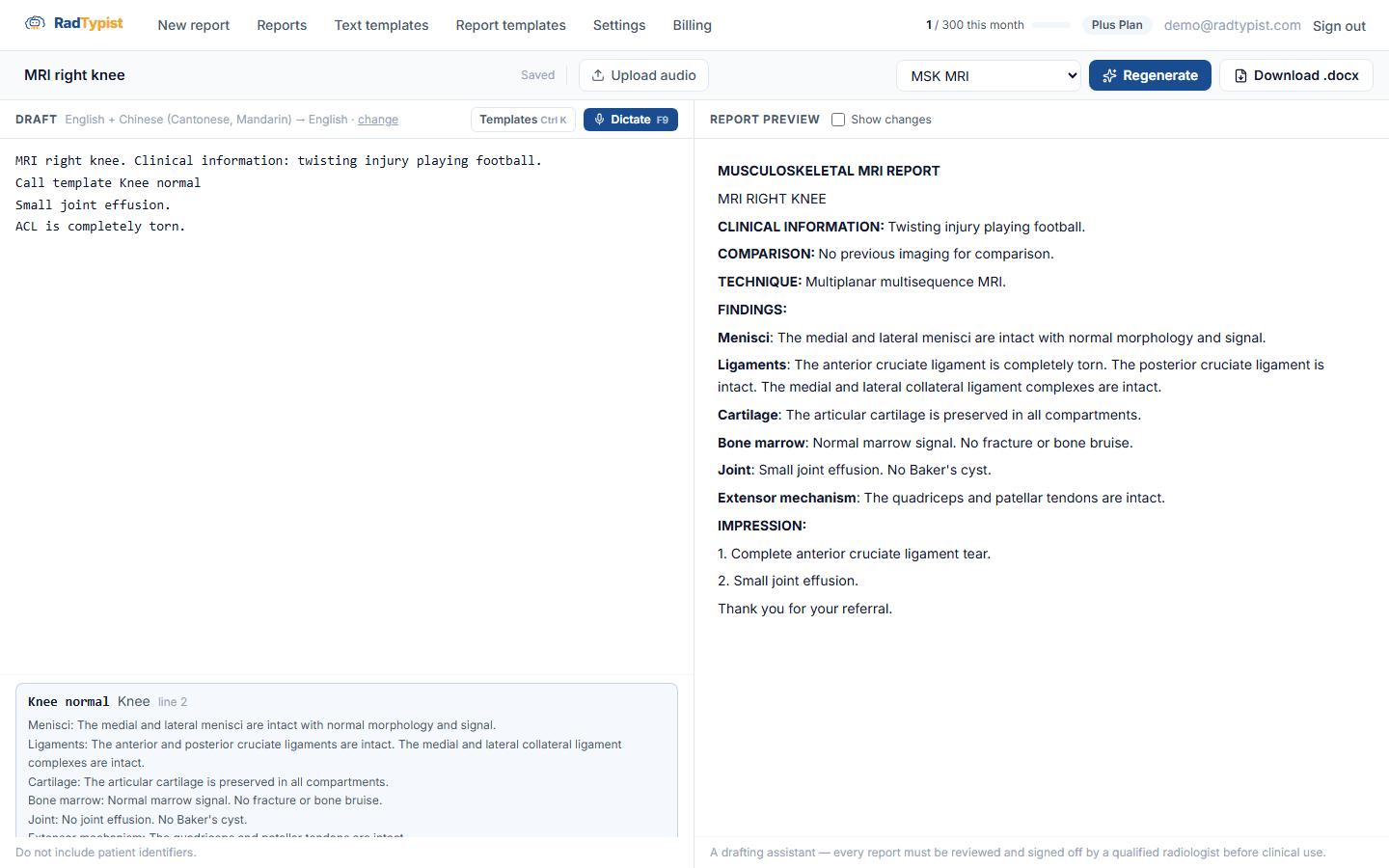
“Call template knee normal, but small joint effusion and the ACL is completely torn.”
Switch languages freely
“冇 joint effusion。 等我睇吓先… medial meniscus intact.”
See RadTypist in action
A real, working product — not a concept. Your draft sits beside the report it generates, and what you review is exactly what you download. Screens shown with sample, de-identified data.

Everything your radiology report needs
Live dictation
Words appear as you speak and land at your cursor. Say punctuation, new lines and headings; one Ctrl+Z undoes a whole passage.
Your normals, by voice
Save normal reports as text templates. Call one by name, add what’s different, and the report keeps the template’s wording around your changes.
Mix languages, pick the output
Dictate in up to three languages at once — English with Cantonese or Mandarin, say — and get the report in the language you choose.
Your exact .docx format
Sections, headings, numbering — a real Word document in your layout, not a plain-text dump.
The preview is the download
Review the .docx itself in your browser, with changes highlighted against your draft. Download waits until the preview is up to date.
Custom templates by study
On Plus, upload your own .docx templates and route each study to the right one by keyword — knee, spine, brain.
Why radiologists choose RadTypist for AI reporting
Generic dictation apps give you a raw transcript. RadTypist gives you a finished radiology report, ready for your sign-off — structured and formatted the way you already work. See how it works as radiology dictation software.
| RadTypist | Generic dictation app | Typing it yourself | |
|---|---|---|---|
| Output format | Your exact .docx template | Plain-text transcript | Whatever you format by hand |
| Live words as you speak | |||
| Natural spoken corrections | Fixed commands | — | |
| Normals by voice, with changes | Fixed macros | Copy and paste | |
| Structured findings & conclusion | Manual | ||
| Radiology + mixed-language tuning | — | ||
| Formatted report | ~30 seconds | Reformat by hand | Several minutes |
| Recordings deleted | Once transcribed | Varies | — |
What radiologists are saying
Real feedback from radiologists using RadTypist for day-to-day reporting.
“It thinks logically and genuinely understands the medical context — more than a human typist ever could. The accuracy is higher than a typist or Dragon, and there are no typos to chase down.”
“I no longer stop mid-dictation to fix what the app got wrong. I just focus on recording, and RadTypist handles the structure, layout and formatting — it restructures my findings into a clean report for me.”
“The recording feels comfortable and uninterrupted, and my reporting efficiency has improved dramatically.”
Simple pricing
Start free. Upgrade when you need more. All prices in USD.
- No credit card
- Live dictation, upload or type
- Text templates by voice
- 30 dictation minutes / mo
- Everything in Free
- In-browser preview & .docx
- Report in the language you choose
- 500 dictation minutes / mo
- Everything in Starter
- 1,500 dictation minutes / mo
- Custom .docx report templates
- Selection rules — auto-route each study to the right template by keyword (e.g. “knee”, “spine”)
A report counts toward your month from its first dictation, upload or Generate — typing a draft is free. Each report includes up to 20 minutes of audio and 5 generates; past that, we ask before counting it as another report.
Your own dedicated radiology typist
For busy practices and departments — a private AI agent that works the way you do, wherever you work. 1,000+ reports a month, with the power features turned all the way up.
Your own dedicated agent
A private AI typist with persistent memory — it learns your phrasing and your edits, so reports sound more like you over time. It works autonomously and runs scheduled batches: drop in a folder of overnight dictations and have finished reports waiting in the morning.
Work from any channel
Submit dictations and get reports wherever you already work — WhatsApp, Telegram, Slack, Discord, or email. Send a voice note, get a formatted report back, without opening the web app.
Dedicated server resources
Your own private instance — you never share a queue with other customers, and you can choose the country where your server is hosted. Consistent, low-latency performance even during peak reporting hours.
Better performance at volume
Process many reports in parallel for fast turnaround across a busy worklist — built for 1,000+ reports a month.
Custom templates + rules
Unlimited per-study templates, automatically matched to each study by your own selection rules — knee, spine, brain, each in its own layout.
Integrations & workflows
Connect Google Drive and email for automatic delivery, plus custom workflows tailored to how your practice runs.
Questions
Is this a medical device?
No. RadTypist is a drafting assistant. Every report must be reviewed and signed off by a qualified radiologist before clinical use.
How does live dictation work?
Press Dictate (or F9) and speak. Words appear as you talk and land at your cursor. Correct yourself out loud — “sorry, lateral”, “scratch that”, “correction, change 8 to 6 mm” — and say punctuation, new lines and headings. Prefer to record elsewhere? Upload the audio and it’s transcribed into the same draft.
Can I use my normal reports?
Yes. Save your normals as text templates, then say “call template knee normal, but small joint effusion” — the report uses the template’s wording with your changes applied. You can also insert one with Ctrl+K or by typing its name.
Which languages can I dictate in?
Mix up to three languages in one dictation — English with Cantonese or Mandarin, for example — and choose the language the report is written in, including Traditional or Simplified Chinese. English and Chinese are the most tested; the speech recogniser supports dozens more.
What counts as a report?
A report counts toward your month from its first dictation, upload or Generate — typing a draft is free. Each report includes up to 20 minutes of audio and 5 generates; past that, we ask before counting it as another report.
Do you store patient data?
RadTypist is for de-identified dictation — don’t include patient identifiers. Live dictation audio streams to the speech recogniser and is never stored by RadTypist; uploaded recordings are deleted as soon as they’re transcribed. Your drafts and reports stay in your account until you delete them.
What audio formats can I upload?
WAV, MP3, M4A and FLAC. You can also upload a dictation in several parts; each is transcribed into the same draft.
Can I use my own report template?
Yes — on Plus you upload your own .docx templates and route studies to them by keyword.
Stop retyping. Start signing off.
Your first 5 reports are free — no card required. Questions, a demo, or a custom setup? Send us a note, or email hello@radtypist.com.
Start free